Custom Style panel
The Custom Style panel offers a variety of building components for selection and tools to help with your personalized building style. Refer to the links below for details on each feature.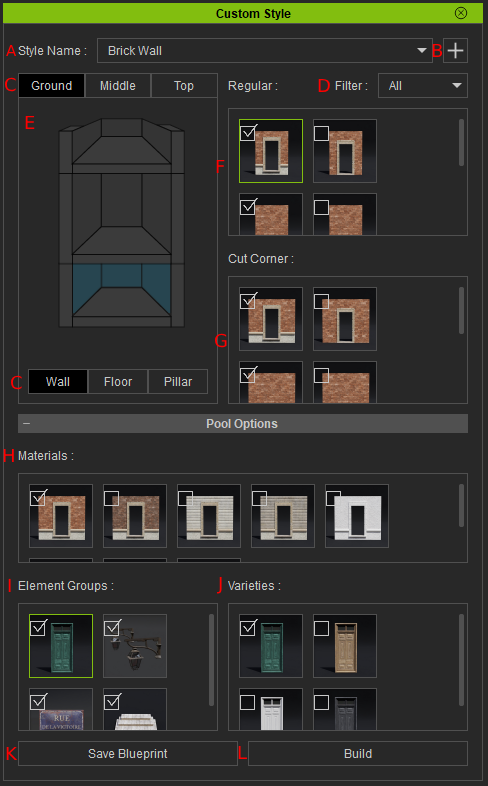
|
UI |
Name |
Function |
|
A |
Style Name |
A list of building styles within the imported iBuildingConfig file for selection and customization. |
|
B |
For modifying building styles within the iBuildingConfig file, you can duplicate, delete, rearrange positions, and edit thumbnails. |
|
|
C |
Building Level and Parts Tabs |
Tabs of different building levels to select from, and the building “Part” types you can select from within each level. |
|
D |
Filter |
A tag filter to filter the building props with different tags based on your selection. |
|
E |
Building Diagram |
Features an interactive diagram for selecting specific parts and levels of the building structure. |
|
F |
Displays the possible Regular wall options. |
|
|
G |
Displays the possible Cut Corner wall options. |
|
|
H |
Lists the material options for the selected parts in the Regular and Cut Corner pools. |
|
|
I |
“Child Element” props that are attached to certain Regular or Cut Corner parts. |
|
|
J |
Varieties |
Various prop and material variations of the selected prop from the Element Groups section. |
|
K |
Save Blueprint |
Saves the current building style settings as a new iBuildingConfig file. |
|
L |
Creates a building using the current settings of the building style you have configured. |
